Using Zed
I’ve started using Zed more lately… the Vim key bindings support works great (I can’t code without that), the speed is better than VSCode, and it is quite customizable. I had given it a few tries in the past, but I’d had trouble with the out of the box customization, mostly with the problems view (e.g. displaying errors in the project). I discovered that a .zed/settings.json configuration was what I was missing for the handful of projects I had seen this issue, though.
This article gives a good overview on how to configure Zed: see https://aronschueler.de/blog/2025/10/21/configure-zed-editor-for-nuxt-linting-and-formatting/. For me, I really just needed something like this:
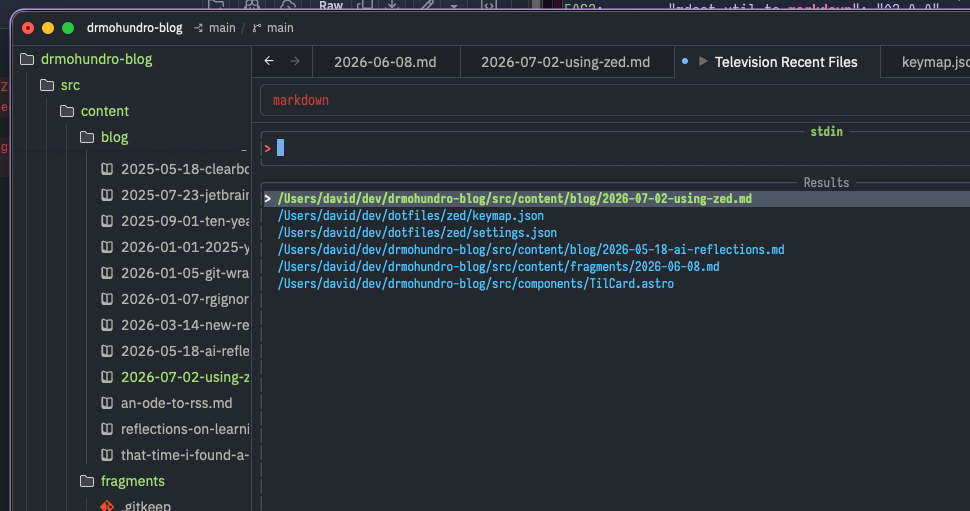
{ "lsp": { "eslint": { "settings": { "configFile": "src/path/to/eslint.config.js" } } }}In addition, there is an annoying gap related to recent files in Zed - see https://github.com/zed-industries/zed/issues/4663. To get around this, I vibe coded a little bun script that watches the Zed database and then drops those recent files out to a local SQLite database. Then, using the Television CLI tool, it can present the per-project most recent files. It makes sense that Zed limits what extensions can do for now, but it does mean getting a bit creative with my solution.
I’m sure it has some gaps, but it works for me for now. And it should be easy enough to work around later.
This is what it looks like:
The zed-recent-files code is up at https://github.com/drmohundro/zed-recent-files and my Zed configuration is up at https://github.com/drmohundro/dotfiles/tree/main/zed.

Discuss this post on Bluesky →