Vimperator really is a great Firefox extension!
A few weeks ago, I posted on the Stack Style Tabs extension for Firefox. I used it for a little while and I realized that it wasn’t exactly what I was looking for… I think it was because I couldn’t use my keyboard arrow keys in addition to ALT-TABing around. What I really wanted was a keyboard-centric way to quickly navigate through my tabs.
Today, I was going through my feeds and noticed a post from Lifehacker on a new experimental feature that Google was working on to allow you to navigate through search results using j/k and a few other keyboard shortcuts. My first thought was that this would be great, because I use the provided keyboard shortcuts to navigate through my feeds in Google Reader all the time. Unfortunately, it was a little rough around the edges still.
Then I saw a comment to the Lifehacker post on vimperator. I had seen posts on vimperator before and had even tried it, but it was a little too weird for me at the time. I mean, I still use my mouse occassionally; however, the comment mentioned that you could type guioptions=mTs and get your menu and toolbars back.
So I thought, eh, why not. I’ll give it a shot again.
So far, I’m liking it.
First off, I’ll recommend turning your menu and toolbars back on using the guioptions setting. It makes the transition to vimperator a little easier. Once you’ve done that, just start browsing.
Here are a couple of my favorite features so far:
- If you press f, you’ll get Hit-a-Hint like labels pop up on all of the anchor tags which will be numbered. If you press the number in the label, it will navigate to that link. No mouse!
- If you press b (comes from the vim idea of buffers instead of tabs), you’ll get a list of your tabs! Just press the number and it will open that tab up! Awesome! THIS is what I wanted for a Firefox extension.
Here’s a screenshot of it in action:
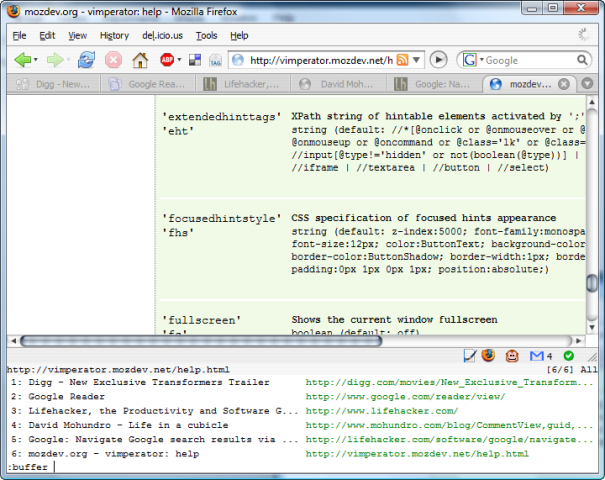
There are a lot of other options that are probably great, but I still need to spend more time learning them. I encourage you to give it a try, too. Don’t worry if it seems a little overwhelming. You can always turn to vimperator’s help, which is excellent.

Discuss this post on Bluesky →